

Introducing Defense Navigator, a Guided Path to Assessment-Ready CMMC Compliance
Emily Bonnie
Senior Content Marketing Manager
For defense contractors pursuing CMMC Level 2, one of the biggest challenges is figuring out how requirements actually apply to their specific environment. Teams spend weeks trying to determine which controls matter, what needs to be implemented first, and how deep implementation needs to go to satisfy an assessor.
That uncertainty doesn't stop once controls are in place. CMMC Level 2 includes 110 practices backed by more than 320 assessment objectives, and each one needs to be implemented, documented, and supported with evidence. Most organizations treat implementation and documentation as separate efforts: first building controls across systems and processes, then trying to document everything afterward. Over time, things drift. Documentation falls out of sync with reality. Evidence is scattered. And as assessment approaches, teams aren't confident that what they've built will hold up under review.
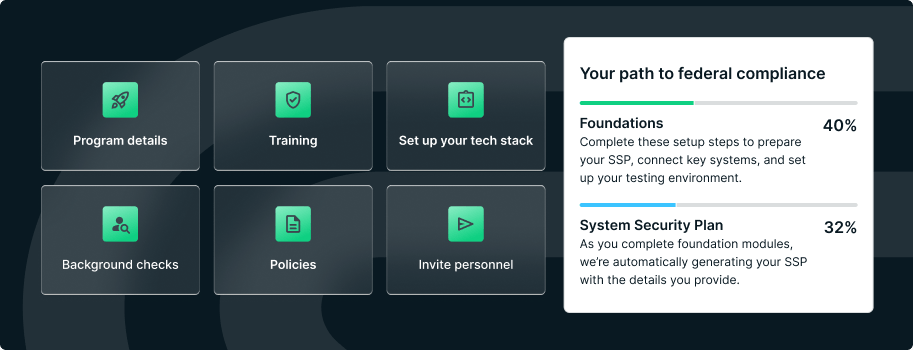
Secureframe Defense removes that uncertainty by connecting these steps from the start. Defense Navigator is a step-by-step workflow that guides teams through scoping and control implementation tailored to their specific environment. Automated Documentation then generates assessment-ready materials directly from what's actually implemented and keeps them current as the environment evolves. The result is a clearer path to compliance, less manual upkeep, and documentation that reflects reality when it matters most.
Recommended reading

Introducing Secureframe Defense: A Complete, End-to-End Solution for CMMC Compliance
Defense Navigator guides scoping and implementation for your unique environment
Defense Navigator prevents these problems by walking teams through control implementation with clear, actionable steps tailored to how their environment actually works.
Start with right-sized scoping
Defense Navigator asks targeted questions about how the organization operates: what types of contracts are supported, how CUI flows through systems, what infrastructure is in place, and which third-party vendors have access to sensitive data. Based on those answers, it applies expert-defined logic to establish a right-sized assessment scope, showing what must be included, what can be excluded, and what should be isolated.
See only what applies to you
Once scope is set, Defense Navigator shows exactly which CMMC controls apply. Instead of reviewing all 110 practices and determining relevance manually, teams see only the requirements that matter for their specific environment. This cuts out wasted effort and focuses attention where it's actually needed.
Follow expert implementation guidance
For each applicable control, Defense Navigator provides clear guidance on what needs to be implemented: technical configurations, process changes, policy requirements, and evidence that will need to be collected. Implementation steps are prioritized based on dependencies and SPRS score impact, so teams know what to tackle first and can build their program efficiently.
Track progress in real time
Teams can see what's complete, what's in progress, what's at risk, and what needs attention next. This visibility eliminates any "are we ready yet?" uncertainty and makes it easier to coordinate work across IT, cybersecurity, and compliance functions.

Automated Documentation generates SSPs and POA&Ms from your live environment
As controls are implemented through Defense Navigator, Automated Documentation captures what's been done and generates the materials assessors will review. Instead of writing documentation separately and trying to keep it aligned with your actual environment, the platform pulls implementation details directly from your systems to build assessment-ready artifacts that stay current over time.
Auto-populate your System Security Plan
Secureframe Defense integrates with cloud providers, identity systems, endpoint management tools, ticketing platforms, and other systems to understand how controls are actually configured and enforced. Instead of writing control descriptions by hand or copying boilerplate language from templates, the platform pulls real data from the environment to automatically populate a System Security Plan.
Generate and maintain your POA&M
This automation extends to the Plan of Action & Milestones. When controls are incomplete or only partially implemented, Secureframe automatically generates a POA&M tied to specific requirements and remediation tasks. As issues are resolved, the POA&M updates to reflect current status. There's no manual tracking, no spreadsheets to maintain, and less risk that outdated information makes it into assessment.
Calculate your live SPRS score
Automated Documentation also calculates a live SPRS score based on control implementation status. The score updates continuously as controls are deployed or remediated, giving teams a real-time view of where they stand. This visibility helps prioritize work based on what will have the greatest impact on SPRS score and assessment readiness, and provides clear benchmarks for tracking progress toward certification.
Keep documentation aligned with implementation
Because documentation is generated from the actual environment rather than written separately, it stays aligned with how controls are really implemented. When assessors review the SSP and ask to see evidence of a specific control, teams can show configurations and logs that match what's documented. There's no scrambling to reconcile differences or explain why reality diverges from the written plan.

Documentation that stays current as your environment evolves
One of the most difficult parts of manual documentation is keeping it accurate over time. Environments change. New systems are added, configurations are adjusted, personnel turnover affects process ownership, and controls drift. When documentation is static, it quickly becomes outdated, which creates risk during recertification.
Automated Documentation addresses this by staying connected to the live environment. When configurations change, documentation updates to reflect those changes. When new gaps are identified through continuous monitoring, they're automatically added to the POA&M with clear remediation steps. When controls are strengthened or expanded, the SPRS score adjusts accordingly.
This continuous alignment means teams don't have to rebuild documentation from scratch before each assessment. The materials are already current, evidence is already organized, and the compliance posture is already visible. Recertification becomes a validation of ongoing readiness rather than a scramble to recreate proof of controls implemented months or years earlier.
Less reliance on consultants and a faster path to readiness
Many contractors rely heavily on consultants to interpret CMMC requirements, guide implementation, and produce documentation. Consultants bring valuable expertise, but this dependency introduces cost, extends timelines, and leaves organizations uncertain about how to maintain compliance once the engagement ends.
Defense Navigator and Automated Documentation embed that expertise directly into the platform. The guidance teams need to scope accurately, implement controls correctly, and produce assessment-ready documentation is built into the workflows. This reduces the need for continuous hand-holding and allows teams to manage and maintain their own compliance programs.
For organizations pursuing CMMC certification for the first time, this shift is particularly important. Instead of waiting weeks for consultant availability or paying for expertise to answer basic questions, teams can move forward independently with confidence that they're following a path shaped by real assessment experience.
Get started with your guided CMMC implementation
If translating CMMC requirements into implementation and documentation has slowed your path to assessment, Defense Navigator and Automated Documentation provide a clear path forward. Learn more about Secureframe Defense, or request a demo to see how Defense Navigator and Automated Documentation work together.
Streamline CMMC end to end


Emily Bonnie
Senior Content Marketing Manager
Emily Bonnie is a seasoned digital marketing strategist with over ten years of experience creating content that attracts, engages, and converts for leading SaaS companies. At Secureframe, she helps demystify complex governance, risk, and compliance (GRC) topics, turning technical frameworks and regulations into accessible, actionable guidance. Her work aims to empower organizations of all sizes to strengthen their security posture, streamline compliance, and build lasting trust with customers.